Skip to content
PictureToSTL

Custom Cookie Cutter Maker

Turn a silhouette, logo or your kid's drawing into a cookie cutter STL. Upload a picture, set the size, and download a file ready to 3D print. Free, no sign-up, no watermark.

Loading cookie cutter maker…

Simple 3-Step Process

How the Cookie Cutter Maker Works

  1. Upload a shape

    A dark silhouette, logo or bold drawing on a light background works best. The picture stays in your browser.

  2. Adjust size and wall

    Set the width of the shape in mm, the cutter height and the wall. Check the outline preview and the 3D model.

  3. Download STL and print

    Download the STL, open it in your slicer and print it flat with the grip lip on the bed. No supports needed.

Make a custom cookie cutter from any picture

This custom cookie cutter maker reads your picture, finds the outer outline of the main shape and builds a cutter around it: a thin cutting wall that follows the outline, plus a wider grip lip at the bottom so the cutter is comfortable to press and stays stiff. Everything happens in your browser, so your picture is never uploaded.

Only the outside edge of the shape is used. Eyes, buttons and other details inside the shape are ignored, and so are small separate parts. That keeps the cutter in one piece and easy to clean. If you want details pressed into the dough, see the stamp tip in the questions below.

Cookie cutter generator test: what we checked on 21 November 2026
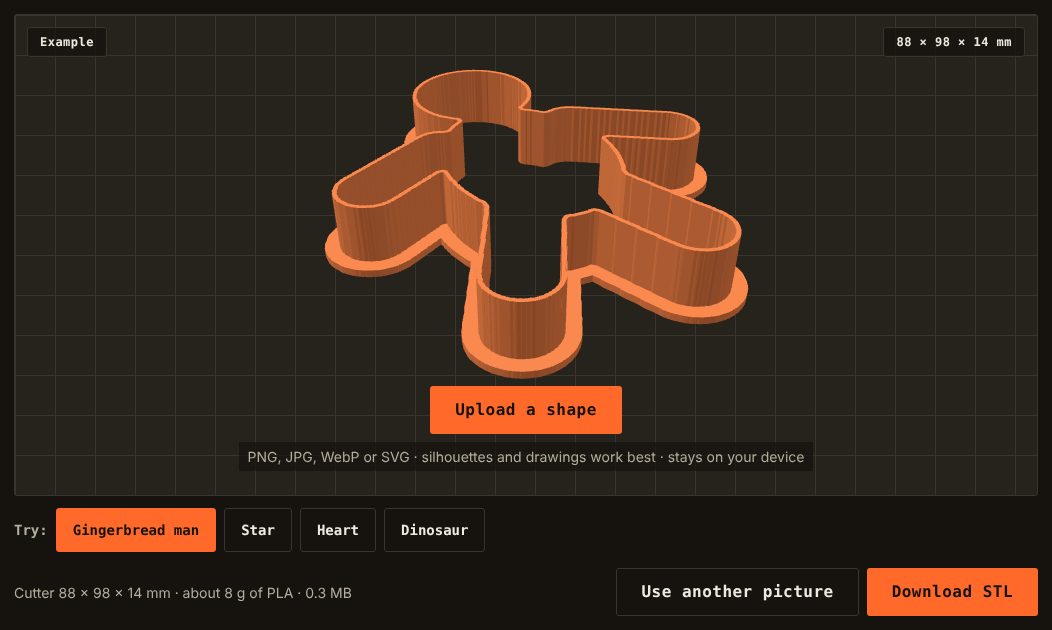
Cookie cutter maker showing a 3D gingerbread man cookie cutter with a grip lip
The gingerbread man example with default settings: an 88 × 98 × 14 mm cutter.

We ran the four built-in examples (gingerbread man, star, heart and dinosaur) with the default settings and checked every exported STL in a mesh library. All four files were closed (watertight) meshes with consistent normals, in a single piece. The gingerbread man came out at 88 × 98 × 14 mm, 6,676 triangles and about 0.3 MB; the others were 0.2 to 0.4 MB. The tool estimated 6 to 8 g of PLA per cutter.

We also uploaded a hand-drawn cat outline with a large gap in the line. The tool showed the warning that the shape was very thin, as intended, because the line was not closed. We have not printed these cutters yet, so check the first layer and the wall in your slicer preview.

Check the cookie cutter outline before you print
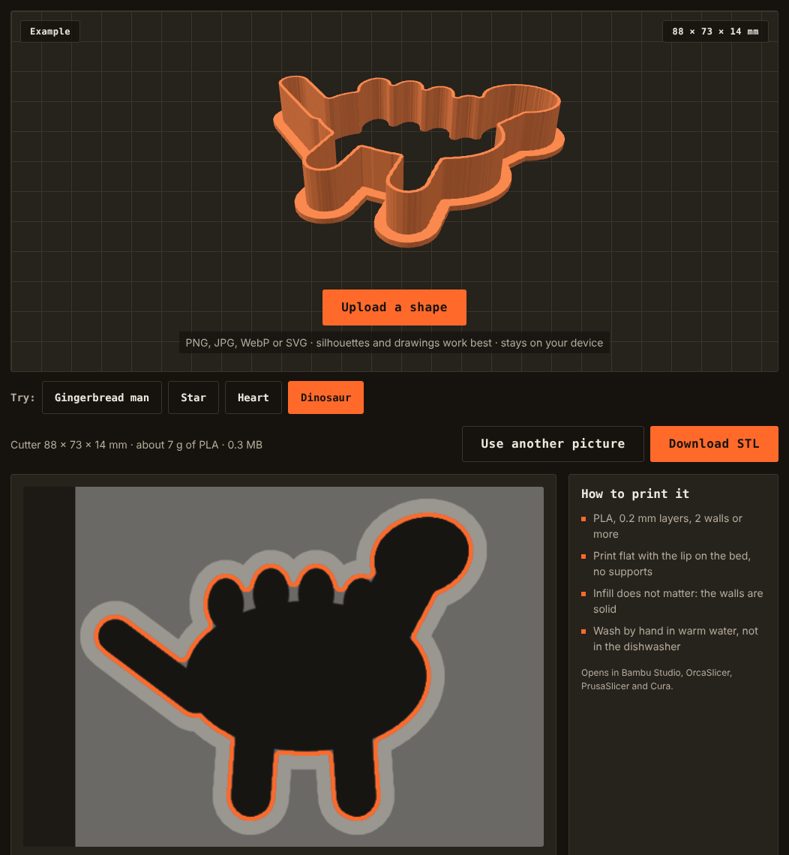
Dinosaur cookie cutter in 3D with the outline preview below it, showing the cutting edge and grip lip
The dinosaur example. Orange is the cutting edge, grey is the grip lip.

Under the 3D view, the outline preview lays the cutter over your picture. The orange band is the cutting wall and the light band is the grip lip. If the outline cuts through the shape, move Outline level until it follows the edge you want, or tick My shape is light on a dark background for white drawings on black paper.

Got questions?

Cookie Cutter Maker FAQ

Is this custom cookie cutter maker free?

Yes. Making and downloading cookie cutter STL files is free and unlimited, with no sign-up and no watermark.

Is my picture uploaded?

No. The outline and the 3D model are made in your browser. Your picture and the STL stay on your device.

How big should a cookie cutter be?

Most cookie cutters are 5 to 10 cm across. Here you set the width of the shape (default 80 mm) and the tool adds the wall and grip lip, so an 80 mm shape gives a cutter about 88 mm wide. Use 100 mm or more for shapes with thin arms or legs so they don't break when you lift the cookie.

Is PLA food safe?

Plain PLA is widely used for cookie cutters, but a 3D print is not certified food safe: layer lines can trap dough and bacteria, and colours and additives differ between brands. The cutter only touches raw dough for a moment, so many bakers accept that. Use a filament the maker sells as food-contact safe, wash the cutter by hand in warm (not hot) water, dry it, and print a new one when it gets worn.

Can I add an imprint (stamp) inside?

Not in this tool. It makes the outline cutter only and ignores details inside the shape. For a pattern on top of the cookie, make a separate stamp with the Image to STL converter (choose Stamp, which mirrors the design for you) and press it onto the cookie after cutting.

What print settings should I use?

PLA, 0.2 mm layer height, 0.4 mm nozzle and at least 2 walls (perimeters), so the 0.9 mm wall prints solid. Print it flat with the grip lip on the bed. No supports are needed and infill does not matter. Clean any strings off the cutting edge before use.

Can I use a photo of my kid's drawing?

Yes. Take the photo in good light, straight from above, on white paper. The tool finds the outline automatically. If the line has a gap, raise Fill small gaps until the shape fills in, or close the gap with a marker and take the photo again. Very thin parts like fingers may need a bigger width.

Can I make a name or text cookie cutter?

Only if the letters touch. The tool keeps the biggest connected shape, so separate letters are dropped. Use a bold script font where the letters join, or draw a thick outline around the whole word and fill it, then upload that.

Why does my cookie cutter ignore the eyes and details?

On purpose. A cutter only follows the outside edge, so details inside the shape would make extra walls that trap dough. The info line under the 3D view also tells you how many separate parts were left out.

Can I edit the cookie cutter STL afterwards?

Yes. The download is a standard binary STL in millimetres, so any 3D editor or slicer that opens STL files can scale, combine or modify it.

More Free 3D Tools

Turn your picture into something you can hold.

Free, private and ready to print.